
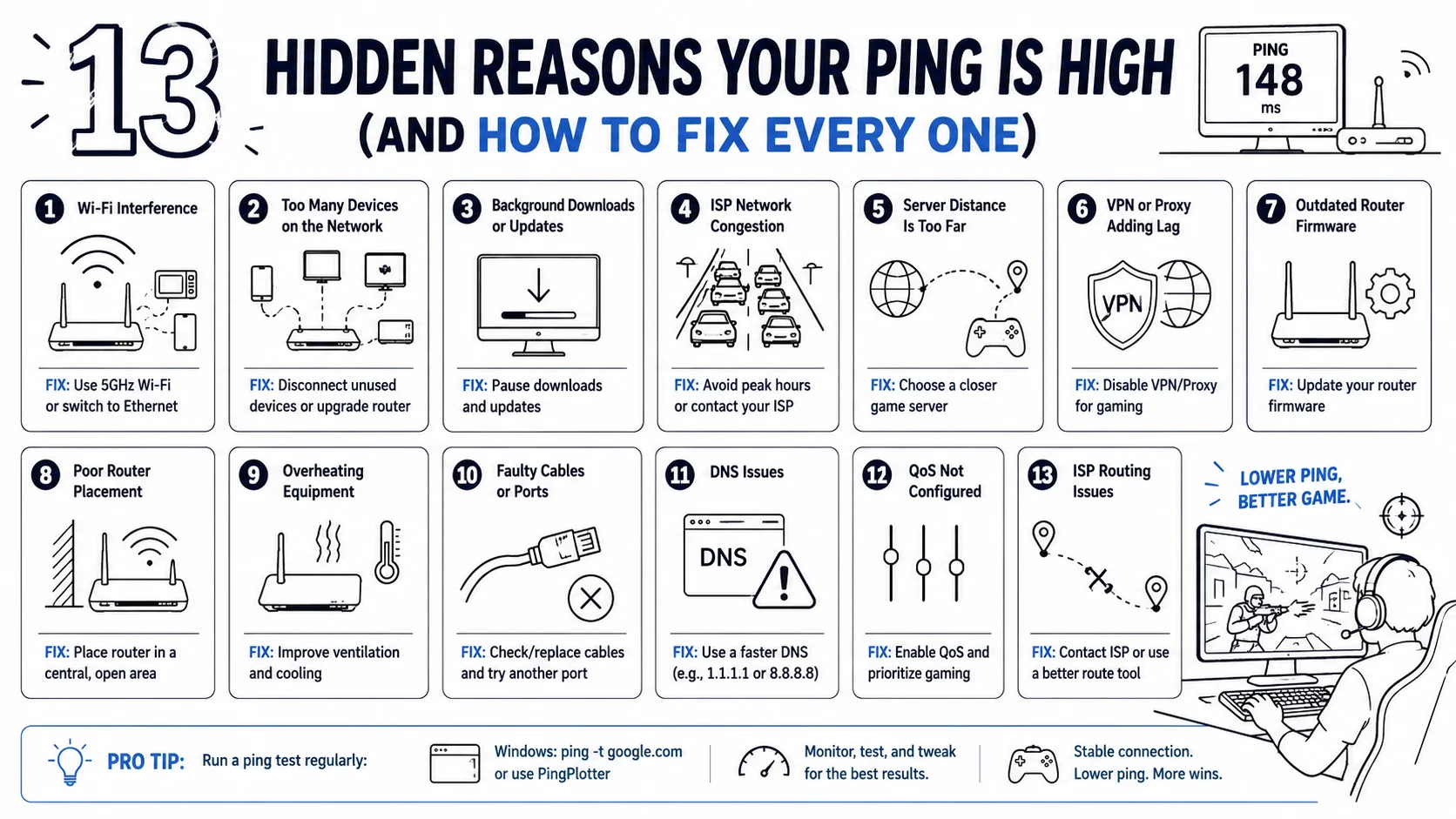

13 Hidden Reasons Your Ping Is High
(And How to Fix Every One)
You’re in the middle of a heated match. The enemy is one shot away from death. You pull the trigger… and nothing happens. Then, half a second later, you’re dead. Your teammates are screaming at you. Your rank is tanking. And you’re left staring at that dreaded red number in the corner of your screen: 148ms.
High ping isn’t just frustrating—it’s game-breaking. And the worst part? Most gamers blame their internet provider and give up. But here’s the truth: your high ping is probably fixable, and the culprits are often hiding in plain sight.
Let’s dive into the 13 hidden reasons your ping is high—and exactly how to fix every single one.
First, What Exactly Is Ping?
Ping (or latency) is the round-trip time it takes for data to travel from your device to a game server and back, measured in milliseconds. Here’s what those numbers actually mean for your gameplay:
| Ping Range | What It Means |
|---|---|
| <20 ms | Excellent – competitive FPS ready |
| 20–50 ms | Good – smooth for most games |
| 50–100 ms | Playable – you’ll notice some delay |
| >100 ms | Risky – lag will disrupt your game |
Anything above 100ms and you’re fighting the server as much as your opponents. Now let’s fix it.
Reason #1: Your Wi-Fi Is Betraying You
You’re sitting three rooms away from your router, and you’re wondering why your ping is spiking? Wi-Fi is the enemy of low latency. Every wall, door, and piece of furniture in between is an obstacle your signal must fight through. Wireless connections are inherently susceptible to interference and jitter that can never be fully eliminated through software adjustments.
The Fix: Switch to a wired Ethernet connection. It provides a stable, predictable connection that Wi-Fi simply cannot match. If you’re on a laptop, a USB-C to Ethernet adapter costs just a few dollars and will transform your gaming experience.
Reason #2: You’re Playing on the Wrong Server
This one sounds obvious, but you’d be surprised how many gamers never check which server they’re actually connecting to. Server location is the single largest factor after your physical connection quality. A server hosted in your region will respond far faster than one on the other side of the planet.
The Fix: Before you blame your ISP, check which server your game is connecting to. Most games let you select your region manually. Choose the closest one. Yes, even if your friends are on a different server—your rank will thank you.
Reason #3: Buffer Bloat Is Crippling Your Router
Buffer bloat happens when your router gets overwhelmed with data traffic and stores excess packets in a buffer queue. The result? Massive latency spikes that make your game feel like you’re playing in molasses.
The Fix: Enable Smart Queue Management (SQM) on your router if available. A $70 router running OpenWrt with SQM will outperform a $300 consumer router in latency-sensitive tasks. Also, check if your router supports QoS (Quality of Service) settings to prioritize gaming traffic.
Reason #4: Your ISP Routing Is Taking the Long Way
Your data packets don’t take the shortest path to the server. They follow routes your ISP has established through peering agreements—optimized for cost and capacity, not for your ping. Two players in the same building on different providers can see wildly different latency to the same game server.
The Fix: This is where a gaming VPN can be a game-changer. A good VPN can shorten connection routes between you and gaming servers, allowing packets to move faster.
Reason #5: Your Neighbors Are Stealing Your Bandwidth
You’re not the only one using your network. If someone in your household is streaming 4K Netflix, downloading massive game updates, or video calling, your gaming traffic gets shoved to the back of the line.
The Fix: Temporarily pause other devices when you’re gaming. If bandwidth overcrowding is a persistent issue, consider upgrading to Wi-Fi 6, which offers increased router capacity. Or better yet, use QoS settings to prioritize your gaming device above all others.
Reason #6: Your Router Is Running Ancient Firmware
When was the last time you updated your router? If the answer is “never” or “I don’t know,” that’s a problem. Outdated firmware can cause connectivity issues, security vulnerabilities, and yes—higher ping.
The Fix: Log into your router’s dashboard and check for firmware updates. Install them. Restart your router afterward to clear temporary files that could be causing issues.
Reason #7: Your DNS Server Is Slowing You Down
DNS issues are one of the most overlooked causes of high ping. Using a DNS resolver that’s slow, far away, or intermittently blocked can add delays during connection setup that look like ping spikes.
The Fix: Switch to a faster DNS provider like Google DNS (8.8.8.8) or Cloudflare DNS (1.1.1.1). The difference can be immediate and significant.
Reason #8: Your Network Hardware Is Overloaded
Routers, switches, and firewalls that are outdated or operating at full capacity can bottleneck data transmission. If your router is more than a few years old, it might simply not have the processing power to handle modern gaming traffic.
The Fix: Consider upgrading your router. Look for one with modern QoS features and sufficient processing power for your household’s needs. And no—the “gaming mode” button on most routers is largely a marketing gimmick.
Reason #9: Background Apps Are Hogging Your CPU
If your CPU is overworked with too many power-hungry apps, it can slow down the processing of your game’s internet traffic—causing higher ping. Windows updates, cloud backups, and browser tabs all count.
The Fix: Close unnecessary applications before gaming. Check your Task Manager for anything consuming significant CPU or network resources. And disable automatic updates during gaming sessions.
Reason #10: Network Congestion During Peak Hours
During peak evening hours, traffic exchange points get overloaded. Your ping at 2 AM might look completely different from your ping at 8 PM.
The Fix: If possible, game during off-peak hours. If not, use QoS to prioritize your gaming traffic and consider a gaming VPN that can route you around congested exchange points.
Reason #11: Your VPN Is Actually Making Things Worse
Here’s the irony: using a VPN can either help or hurt your ping. While a good gaming VPN can optimize your route, a standard VPN makes it seem like you’re farther away from the server than you actually are. This can add significant latency.
The Fix: If you’re using a VPN, make sure it’s specifically optimized for gaming. Not all VPNs are created equal—some add latency instead of reducing it.
Reason #12: Packet Loss Is Ruining Your Connection
Packet loss occurs when data packets fail to reach their destination. When packets are lost, your game has to resend them, causing delays that manifest as high ping and rubber-banding.
The Fix: Run a packet loss test using tools like PingPlotter. If you’re experiencing packet loss, check your Ethernet cable, update your network drivers, and ensure your router isn’t overheating.
Reason #13: Your Network Drivers Are Outdated
Outdated or incompatible network drivers can cause significant performance issues. This is one of the easiest fixes that most gamers completely overlook.
The Fix: Update your network drivers through Device Manager (Windows) or your manufacturer’s website. Run the Windows network troubleshooter for good measure.
🚀 The Ultimate Fix: Gaming VPN
You’ve tried everything. You’re on Ethernet. You’ve updated your drivers. You’ve kicked everyone else off your network. But your ping is still stubbornly high.
Here’s the thing: your ISP’s routing is often the real culprit, and it’s completely outside your control. That’s where a gaming-optimized VPN comes in.
A good gaming VPN doesn’t just hide your IP—it actively finds faster routes to game servers, reducing the number of hops your data has to make. The result? Lower ping, less lag, and a competitive edge that actually matters.
Stop letting your ISP’s bad routing cost you wins.
🔥 Ready to Dominate Your Games?
CLICK HERE TO GET THE BEST GAMING VPNFinal Thoughts
High ping isn’t a life sentence. Most of the time, it’s caused by one of these 13 hidden issues—and every single one has a fix. Start with the basics: switch to Ethernet, check your server region, and update your router firmware. Then work your way down the list.
But if you’ve done all that and your ping is still holding you back, don’t blame your internet. Blame your ISP’s routing—and fix it with a gaming VPN that actually works.
Your rank is waiting. Your teammates are counting on you. And that enemy who keeps killing you before you can react?
Not anymore.